

If an access switch has one uplink to each of two Catalyst 9500s, StackWise Virtual lets you put both uplinks in the same EtherChannel. The two cores operate as one logical switch, so the access switch sees one LACP partner. Both chassis can forward traffic while one runs the active control plane and the other provides hot standby through Stateful Switchover (SSO).
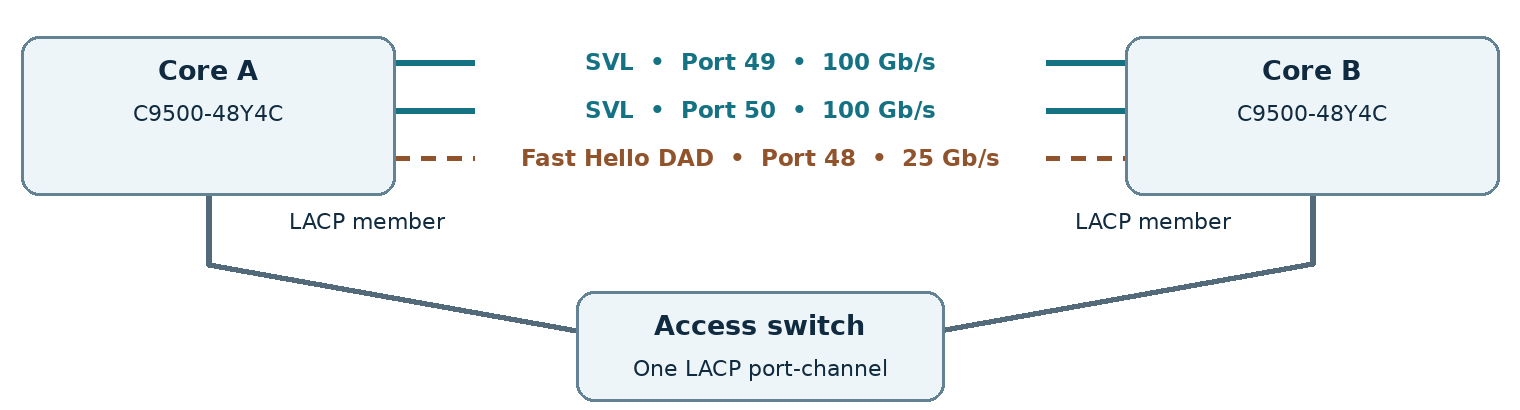
What each link does
The StackWise Virtual Link (SVL) carries control traffic and any data that needs to cross between chassis. Using two physical links lets the pair stay connected if one fails. Size the remaining link for the traffic that could cross it during that failure.
The dedicated Fast Hello Dual-Active Detection (DAD) link handles a different failure. If every SVL goes down while both switches are still powered on, the former standby can take over and the former active enters recovery, disabling its data interfaces. That keeps two devices from forwarding with the same logical switch identity.
The access switch uses a multichassis EtherChannel (MEC). One physical member goes to each core, so the bundle can keep forwarding through the surviving member if one core or one uplink goes down, assuming the bundle allows operation with one link.
Configure the virtual pair
This example uses two C9500-48Y4C switches on IOS XE 17.15.x. Before staging, verify that both have the same model, software version, Network Advantage license and SDM template. Keep VLAN 4094 free for StackWise Virtual on this platform. Use supported Cisco optics and native ports at the same speed for both SVL members.
Cable ports 49 and 50 directly to their matching ports on the peer for the two 100 Gb/s SVL members. Connect port 48 to its peer for 25 Gb/s Fast Hello DAD. Route the DAD cable separately from the SVL cables where practical so one cable-path failure is less likely to affect both.
Stage both switches before reloading
On each standalone switch, use its current interface names. The example assumes that both start as switch 1. Assign both switches to domain 10 and both 100 Gb/s ports to SVL 1. Use unused ports, since conversion repurposes the interfaces.
configure terminal
stackwise-virtual
 domain 10
 exit
interface HundredGigE1/0/49
 stackwise-virtual link 1
 exit
interface HundredGigE1/0/50
 stackwise-virtual link 1
 exit
interface TwentyFiveGigE1/0/48
 stackwise-virtual dual-active-detection
end
write memory
After saving on both switches, issue reload on each during the same planned maintenance window. Use console or out-of-band access and keep production uplinks isolated until the pair is healthy. After formation, use show switch to map both chassis to their member numbers. Manage the pair through the active switch.
For a brownfield conversion, back up both standalone configurations and map the VLANs, SVIs, routing and port settings into the intended shared configuration before cutover. Plan for a service interruption during the initial conversion.
Verify the pair before connecting traffic
show switch
show redundancy
show stackwise-virtual
show stackwise-virtual link
show stackwise-virtual dual-active-detection
Confirm that both members are Ready, the peer is STANDBY HOT in SSO mode, and the pair is in domain 10. Verify both physical SVL members are up and ready, and confirm that both DAD endpoints report up. If either link type is down, check the port mapping, optics and link speed before connecting the access switch.
Bring up the access uplinks
From the active core, assign one data port from each chassis to the same LACP channel group in active mode. On the access switch, put both uplinks into a single LACP bundle. Match the trunk settings across the two ends, including the native and allowed VLANs. Use show etherchannel summary on both ends to confirm both links are bundled, then verify that traffic passes on the intended VLANs.
Test one failure at a time
During a maintenance window, keep test traffic running and remove one access uplink. Confirm the port-channel stays up and measure any packet loss. Restore it, then remove one SVL member and confirm the pair stays formed. Test a planned switchover separately, checking gateway reachability and any expected routing adjacencies. Use an isolated lab to test complete SVL loss with DAD still connected and observe recovery.
The value of StackWise Virtual shows up during maintenance. You can lose one physical link or one chassis and still have a forwarding path. Testing those failures before handing over the network tells you which services actually stay reachable.