

When servers in different racks need to talk, how many paths can their traffic take? In a spine-leaf network, every leaf connects to every spine. That gives traffic multiple ways to reach another rack and a way around a spine that goes offline.
How traffic moves between racks
Servers and storage plug into leaf switches. When a server in Rack A sends data to Rack B, Leaf A sends it through one of the spines to Leaf B. If both servers are on the same leaf, their traffic can stay there.
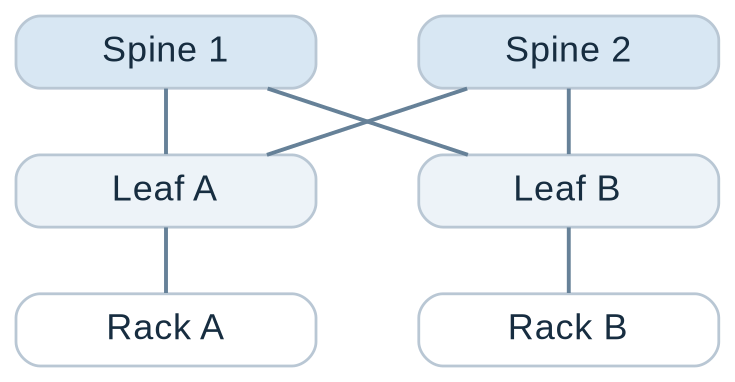
A common setup uses BGP to share routes between switches and equal-cost multipath (ECMP) to spread traffic across the spines [1]. Each flow usually takes one path, so two large transfers can land on the same link even when another link has room.
What happens when a spine goes down
Say a leaf has eight 100 GbE server ports and two 400 GbE uplinks, one to each spine. That gives it 800 Gb/s of capacity on each side, a 1:1 ratio. Take one spine offline and the same servers now share 400 Gb/s of uplink capacity. That’s a 2:1 oversubscription ratio.
As the data center grows, you can add leaves for more server ports or add spines for more uplink capacity. Either way, check that the existing switches have ports available for the new connections.
Where EVPN and VXLAN fit
Some data centers need to keep customers’ networks separate or extend the same network across racks. VXLAN carries those separate networks over the same physical links. EVPN tells the switches where to find the devices on each network [2].
How this works in a 400G AI cluster
FS’s 400G design shows four networks [3]. One carries traffic between GPU servers, another connects users and applications, a third handles storage, and a fourth gives administrators a separate way to manage equipment.
The GPU network uses RoCEv2 to move data directly between servers’ memory over Ethernet. When many GPUs send data to the same destination at once, a switch queue can fill quickly. Explicit Congestion Notification (ECN) gives senders a signal to slow down. Priority Flow Control (PFC) can briefly pause a specific class of traffic on a link [4, 5].
Test it with a spine offline
Run a representative workload with both spines online, then run it again with one spine offline. Track how long the job takes and check the remaining links for congestion and dropped packets. That tells you whether the cluster can handle a spine outage or a maintenance window at peak load.